Download
Download the script for 3dsmax here.
Once you have downloaded and installed the 3dsmax script follow the directions in the Youtube video to swap your V-Ray materials.
Description
I made this script so that you can quickly swap your textures within your v-ray materials without having to manually search for each bitmap when creating new materials that are similar to other ones you have already created in the scene. Works best with PBR workflow since most material values should be default and only the textures need replacing.
Important Notes
The script relies on your object name matching your texture name. For example:
Geometry Name – 3DC_KISC_Oven
Texture Names – 3DC_KISC_Oven_BaseColor.png, 3DC_KISC_Oven_Roughness.png, etc.
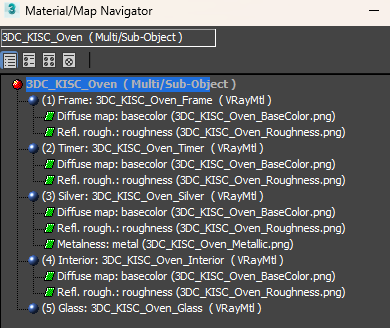
The script also works with Multi-Sub materials and will suffix your sub-materials with the ID name. For example:
Multi-Sub Name – 3DC_KISC_Oven
Sub-Material ID Name – Frame, Timer, Silver, etc
After running the script your sub-material names will be:
3DC_KISC_Oven_Frame, 3DC_KISC_Oven_Timer, 3DC_KISC_Oven_Silver, etc.
It will also replace all textures within the multi-sub with the ones that relate to that object name (as per the description). Example below:


 James Vella
Leave a comment